
Audio
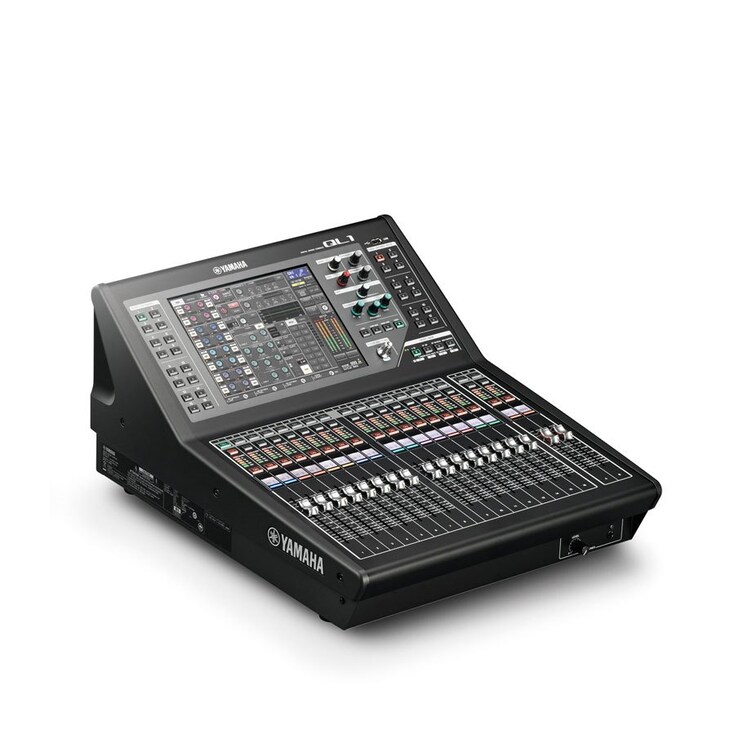
Yamaha QL1
A compact digital mixing console for live sound, speech and monitor mixes. Trace the source, mix channel and output separately before changing the show configuration.
Need this equipment for your project?
Ask GLMedia about rental or purchase options and advice on a compatible configuration. Availability, configuration, location, price and terms are confirmed for your request.
Model and application
- Manufacturer / model
- Yamaha QL1 digital mixing console; QL series.
- Mixing capacity
- 32 mono + 8 stereo input mixing channels.
- Local analog I/O
- 16 INPUT XLR inputs; 8 OMNI OUT XLR outputs.
- Dante audio
- 32 inputs / 32 outputs at 48 kHz; PRIMARY / SECONDARY etherCON ports.
- Surface / buses
- 16 + 2 master faders; 16 MIX and 8 MATRIX buses.
Mixing channels, physical connectors and Dante channels are different counts. Confirm the unit label, installed firmware, optional cards and connected I/O rack model before applying a saved configuration. Yamaha currently lists the QL1 as discontinued; that does not establish the condition or availability of a particular unit.
Connections and capacities
The separate NETWORK RJ-45 port serves QL Editor / StageMix control; it is not the Dante audio port. Other connections include AES/EBU DIGITAL OUT, two Mini-YGDAI slots, WORD CLOCK IN/OUT, MIDI IN/OUT, GPI, PHONES and USB Type-A for USB memory. Expansion cards and the RK1 rack kit are optional; do not assume they are installed or included.
Basic preparation
- Record firmware, scene number, source, channel, bus and physical destination. Save a separate backup before changing a working show; do not load an unfamiliar file as a troubleshooting shortcut.
- Place the console on a stable surface with rear and side vents clear. Check the unit's power nameplate, suitable cord and protective earth before connecting power. Keep powered speakers and amplifiers off while making connections.
- For a local source, inspect its INPUT number and the selected channel's GAIN/PATCH. For a network source, also identify the Dante transmitter and receive channel. Use correctly shielded CAT5e-compatible cabling and a suitable Gigabit Dante network.
- With destinations protected, check one agreed source at a modest level, then its mix bus and output patch. Raise the downstream system only when that path is verified; record actual results separately from expected behavior.
Questions and troubleshooting
A source is connected to INPUT 1, but CH 1 is silent. Where should I start?
Do not assume the connector number determines the mix channel. The channel may be assigned to another local, slot or Dante input.
- Confirm the source is producing signal and note its physical connector. Select the intended channel with [SEL]; inspect GAIN/PATCH for INPUT 1 before changing any assignment.
- Observe that channel's meter and, at a safe headphone level, its CUE. Record whether the signal is missing at the input or disappears later. Check gain without toggling +48V as a test.
- If the channel receives signal, inspect [ON], fader, DCA/mute group state, the intended STEREO or MIX route and the destination bus meter. Then trace OUTPUT PORT to the actual OMNI OUT or Dante destination.
- Make only the agreed correction, with downstream levels protected, and verify the same source at the intended destination. If there is still no input indication, test one known-good source/cable on an agreed spare path and retain the original settings for comparison.
- If the known-good source works on the spare path but not the original, record both port assignments and meter states for support; this comparison localizes the problem but does not prove a failed preamp. Stop trial changes if multiple destinations are affected.
The network cable is connected, but a Dante source is missing. What should I compare?
A cable link alone does not confirm clock synchronization, a subscription or the channel's internal patch.
- Read the rear-panel label: audio must use Dante PRIMARY/SECONDARY, rather than the separate NETWORK control port. Observe LINK/ACT and 1G, then check the rack's power and exact identity.
- Record SECONDARY PORT in SETUP → DANTE SETUP and compare it with the actual cabling plan. REDUNDANT requires separate primary and secondary networks; do not bridge them or switch to DAISY CHAIN during a live program.
- Compare sample rate and clock status, then follow transmitter → QL1 Dante receive channel → GAIN/PATCH. The QL1's built-in Dante range is 1–32. If patch editing is refused, record DANTE PATCH BY and the exact message before arranging an authorized change.
- For intermittent audio, give the network operator the clock, link and error observations. Yamaha warns against EEE / Green Ethernet on Dante links. Schedule any topology or switch changes outside the program, then repeat one agreed route test.
- After an agreed correction, verify the same Dante source through channel, bus and destination. If local and network sources both fail, compare their shared output stages before blaming Dante; preserve logs and seek Yamaha support if the failure repeats.
A scene recalls, but the channel's input patch stays unchanged. What should I inspect?
Compare the expected input port with the displayed port before assuming that the scene failed.
- Record the source and destination scene numbers/titles, channel and expected port. Keep a backup and protect outputs before any recall test.
- Inspect CH JOB → RECALL SAFE, including GLOBAL RECALL SAFE → INPUT PATCH and the channel's SAFE settings. Check the destination scene's FOCUS as well; either function can exclude a parameter from recall.
- Agree which route may change and which must remain fixed. Avoid CLEAR ALL; global INPUT PATCH protection also covers insert and Direct Out patching. Review those paths before altering protection.
- Test the two scenes outside the live program and compare the input port and destination each time. If the port changes but the source does not, inspect the Dante subscription separately. Record the result before making another change.
- A successful test applies the intended port in both scenes while preserving the protected routes. If displayed exclusions and recall results disagree, retain both scene files and firmware details for Yamaha support rather than clearing all protection.
Choose the next check
| Observation | Check | Next step |
|---|---|---|
| No input meter | Source, cable and GAIN/PATCH | Isolate one source on an agreed test path. |
| Input meter present; output silent | Channel, bus and OUTPUT PORT | Find the first stage that loses signal. |
| Dante link present; source absent | Clock, subscription and internal patch | Record all three before editing. |
| Recall leaves the old input port | Global/channel Recall Safe and scene Focus | Review only the intended exclusions. |
Documented precautions
- Follow the voltage on the actual unit's nameplate and use protective earth. Keep liquids away and leave rear/side vents unobstructed; do not open the console.
- Enable +48V only for a compatible device that requires it. Do not connect or disconnect that input while phantom power is active. Yamaha specifies amplifiers/powered speakers off and console output controls at minimum when switching phantom power.
- Power on amplifiers last and power them off first. Protect destinations before patch changes or recalls. If there is smoke, an unusual smell, liquid ingress or physical damage, stop use and arrange qualified service.
Official documentation and photographs
Official sources checked on October 22, 2026. The procedures above are proposed checks, not tests performed on your equipment. Menu wording can vary with installed firmware.
- Yamaha — QL Series / QL1 — QL1 identity, application, mixing capacity and optional RK1 kit.
- Yamaha — QL Series specifications — QL1 column, Dante footnote and connector specifications.
- Yamaha — QL5/QL1 Owner’s Manual — Owner's Manual: pp. 5–6 precautions; pp. 16–17 connectors; pp. 31–32 network wiring; p. 35 phantom power and input checks.
- Yamaha — QL5/QL1 V1.0 Reference Manual — V1.0 Reference Manual: pp. 14–17 patching; pp. 61–63 Recall Safe; pp. 80–81 Focus; pp. 192–196 Dante setup. This is the edition consulted for the basic operations.
- Yamaha — QL Series downloads — Official download index: locate the reference manual and compatibility information matching the installed firmware.
- Yamaha — QL1 Firmware V5.91 release notes — QL1 V5.91 release notes: compatibility and EEE warning; this does not identify the installed version or recommend an update during an event.
See the official QL1 gallery for an overall view and rear-panel photograph. These images are linked for reference, not reproduced here.

Before use, confirm installed firmware, regional power label, optional cards, rack model/firmware and the event's network topology. These details are specific to the actual system.